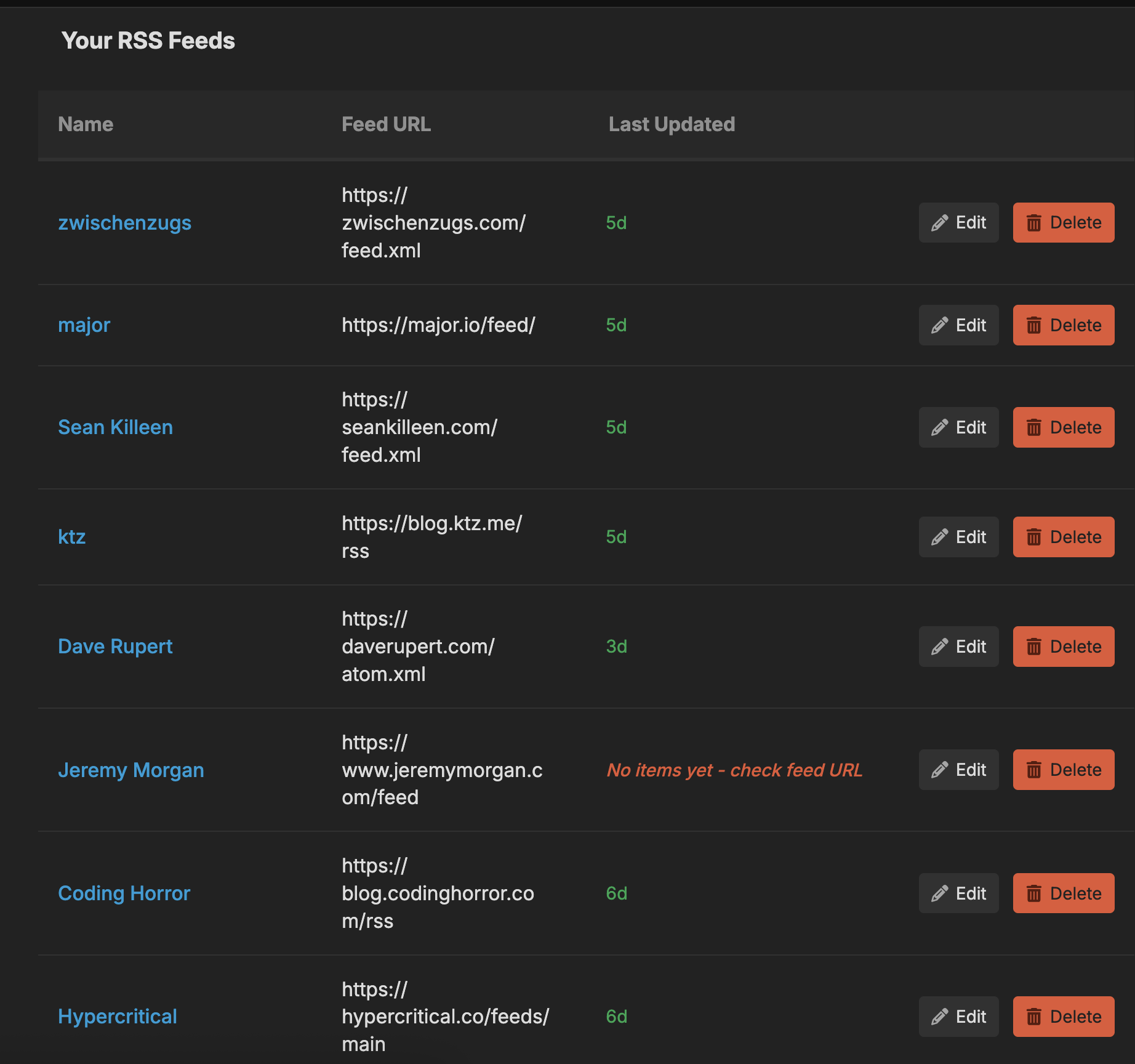
<?xml version="1.0" encoding="utf-8"?><feed xmlns="http://www.w3.org/2005/Atom" ><generator uri="https://jekyllrb.com/" version="3.10.0">Jekyll</generator><link href="https://blake.app/blog/feed.xml" rel="self" type="application/atom+xml" /><link href="https://blake.app/" rel="alternate" type="text/html" /><updated>2026-03-04T14:36:05+00:00</updated><id>https://blake.app/blog/feed.xml</id><title type="html">blake.app</title><subtitle>Blake Erickson&apos;s personal blog</subtitle><author><name>Blake Erickson</name></author><entry><title type="html">Recourss Edit Feeds</title><link href="https://blake.app/blog/recourss-edit-feeds/" rel="alternate" type="text/html" title="Recourss Edit Feeds" /><published>2025-10-18T07:00:00+00:00</published><updated>2025-10-18T07:00:00+00:00</updated><id>https://blake.app/blog/recourss-edit-feeds</id><content type="html" xml:base="https://blake.app/blog/recourss-edit-feeds/"><![CDATA[<p>Today I worked on the edit feed feature in <a href="https://app.recourss.com">Recourss</a>. This will allow you to rename a feed, fix the feed url, and also see when it was last fetched.</p>

<p><img src="/assets/img/edit-feed.png" alt="recourss-edit-feed" /></p>

<p>This will allow you to easily see which feeds are stale. I should probably add some sort of sort feature next. You can also see if a feed has never been fetched which means the url is probably bad.</p>

<p>The last change I made was I removed the link from the feed url so that it is just rendered as text. Clicking on the rss feed url isn’t usually very friendly as your browser will either open up the giant xml file, download it, or complain. I then added a url though to the feed name that takes you to all the posts for the specific feed.</p>

<p>It’s nice to keep polishing an app I’m working on and currently using. Hopefully I can keep making it a little bit each day.</p>]]></content><author><name>Blake Erickson</name></author><summary type="html"><![CDATA[Today I worked on the edit feed feature in Recourss. This will allow you to rename a feed, fix the feed url, and also see when it was last fetched.]]></summary></entry><entry><title type="html">Blogs I Like - Oct 2025 Edition</title><link href="https://blake.app/blog/blogs-i-like-oct-2025/" rel="alternate" type="text/html" title="Blogs I Like - Oct 2025 Edition" /><published>2025-10-17T07:00:00+00:00</published><updated>2025-10-17T07:00:00+00:00</updated><id>https://blake.app/blog/blogs-i-like-oct-2025</id><content type="html" xml:base="https://blake.app/blog/blogs-i-like-oct-2025/"><![CDATA[<p>I really like personal blogs. They have personality. We should all visit them more.</p>

<p>Yes, I’m building an <a href="https://app.recourss.com">RSS reader</a>. Not so that I can avoid looking at websites, but so that I can visit them more! Be sure to click through and visit the source. They really are modern art and way more fun to visit than just a social media feed.</p>

<ul>
  <li><a href="https://birchtree.me">birchtree</a> - Love the sidebar, has a link feed, and even gated member content.</li>
  <li><a href="https://jakegoldsborough.com">Jake Goldsborough</a> - Jake is one of my new co-works at Discourse! Love the theme.</li>
  <li><a href="https://daverupert.com">Dave Rupert</a> - Unique design and even has a Bookshelf to peruse.</li>
  <li><a href="https://www.mikeperham.com/">Mike Perham</a> - Simple with a long history. I like how he’s using a personal blog still for such a successful project like Sidekiq.</li>
  <li><a href="https://leerob.com">Lee Robinson</a> - So clean. Even has some subtle stats.</li>
</ul>]]></content><author><name>Blake Erickson</name></author><summary type="html"><![CDATA[I really like personal blogs. They have personality. We should all visit them more.]]></summary></entry><entry><title type="html">A Terrible Way To Work</title><link href="https://blake.app/blog/a-terrible-way-to-work/" rel="alternate" type="text/html" title="A Terrible Way To Work" /><published>2025-10-16T07:00:00+00:00</published><updated>2025-10-16T07:00:00+00:00</updated><id>https://blake.app/blog/a-terrible-way-to-work</id><content type="html" xml:base="https://blake.app/blog/a-terrible-way-to-work/"><![CDATA[<p>I’ve been working on <a href="https://github.com/discourse/discourse_api_docs/pulls?q=is%3Apr+is%3Aclosed+created%3A2025-10-16">a GitHub action today</a> to automatically validate the <a href="https://github.com/discourse/discourse_api_docs/blob/main/openapi.json">openapi.json schema</a> we generate from Discourse. Every time I work on a GitHub action I’m impressed and my mind starts turning about ways that I can use them even more. They are incredibly convenient for automating tasks and I kind of want to use them for everything.</p>

<p>Equal to the level of inspiration though, I also get incredibly frustrated because I’m working on code that can really only run in “production”. I often have no idea if something will work until I merge my PR and manually test it. It’s a terrible way to work.</p>]]></content><author><name>Blake Erickson</name></author><summary type="html"><![CDATA[I’ve been working on a GitHub action today to automatically validate the openapi.json schema we generate from Discourse. Every time I work on a GitHub action I’m impressed and my mind starts turning about ways that I can use them even more. They are incredibly convenient for automating tasks and I kind of want to use them for everything.]]></summary></entry><entry><title type="html">Prolonged Effort</title><link href="https://blake.app/blog/prolonged-effort/" rel="alternate" type="text/html" title="Prolonged Effort" /><published>2025-10-15T07:00:00+00:00</published><updated>2025-10-15T07:00:00+00:00</updated><id>https://blake.app/blog/prolonged-effort</id><content type="html" xml:base="https://blake.app/blog/prolonged-effort/"><![CDATA[<p>From the <a href="https://www.youtube.com/watch?v=qjPH9njnaVU">Pavel Durov episode</a> of the Lex Fridman podcast:</p>

<blockquote>
  <p><strong>Lex Fridman</strong> (04:19:33) Another thing we’ve talked about, which I think is a fascinating topic, is the power of the mind, power of thought. Do you believe you can affect your life and reality by thinking about it, by manifesting it into being? What do you think?</p>

  <p><strong>Pavel Durov</strong> (04:19:55) There are many explanations why it works. One thing most people agree on is that setting goals and staying positive and confident does allow you to achieve the things you want to achieve. It’s very hard to believe though that you can just manifest things into being without applying effort in the direction that seems to be logical. Maybe some people exist that can just sit on the bank of a river and materialize things by the power of their thought. But I’m not sure I’m one of these people. I always found it more easy to believe that if you couple this optimism and faith with logical action, then it is bound to be successful.</p>

  <p><strong>Lex Fridman</strong> (04:21:04) Prolonged effort, hard work, coupled with positive focus, thinking about the thing.</p>

  <p><strong>Pavel Durov</strong> (04:21:13) Oh yes, over many, many, many days. It’s possible to imagine our world as a high dimensional universe where humans have the ability to navigate through it with the power of belief, which is coupled with positive emotion and logical thinking. But we are getting into an esoteric realm. We don’t have any proof of that. But we also know that we probably at this point haven’t discovered even 1% about this universe.</p>

  <p><strong>Lex Fridman</strong> (04:22:00) I agree with you fully, and I like what you said in the way you were thinking about it. You’ve told me before that maybe there’s a way that with effort and with the focused mind, you can shape, you can morph the landscape of probabilities around you. It’s a nice way to visualize it, that somehow our effort and our focus changes the things that are likely and less likely. And by focusing on it, we make the thing more and more likely, at least as an estimate, as the kind of field that we, through our thoughts and through our actions, change that field.</p>
</blockquote>

<p>Every major accomplishment in my life has been from prolonged effort, hard work, coupled with positive focus, thinking about the thing I wanted to accomplish. Pretty much to the point of obsession. Taking notes, writing down ideas, setting goals, and tracking my progress. Waking up early or staying late to work on it. Putting in the work day in and day out. The times in my life where maybe I didn’t accomplish much were all because I didn’t have a goal, and I didn’t have focused effort. Sure you get stuff done, but its no where near the same level of what you could have pulled off. Not even close.</p>]]></content><author><name>Blake Erickson</name></author><summary type="html"><![CDATA[From the Pavel Durov episode of the Lex Fridman podcast:]]></summary></entry><entry><title type="html">The Best Free Email Service for Hobby Projects</title><link href="https://blake.app/blog/smtp2go/" rel="alternate" type="text/html" title="The Best Free Email Service for Hobby Projects" /><published>2025-10-14T07:00:00+00:00</published><updated>2025-10-14T07:00:00+00:00</updated><id>https://blake.app/blog/smtp2go</id><content type="html" xml:base="https://blake.app/blog/smtp2go/"><![CDATA[<p>When setting up self hosted Discourse forums or any other web app I happened to be making I used to use SendGrid. They had a generous free plan. Since I never really sent that many emails I never had to pay. I would just generate an API key for the email sending that I needed and be on my way. I’m not against paying for a service. Totally down for it, but my projects have all been little hobby projects and never really taken off. So, I’d rather not pay for a service I’m not really using all that much. Anyways, SendGrid now requires me to pay $20 per month, so I went looking for a new email service that offered a free tier that doesn’t expire.</p>

<p>I first started out with <a href="https://postmarkapp.com/">Postmark</a>, which does seem like a nice service, but they require a manual verification to approve your app before sending will work. Since I setup <a href="https://app.recourss.com">my project</a> over the weekend they wouldn’t get back to me until Monday, so I bounced. They later did approve me after the weekend was over and I explained to them what my app did (its an <a href="https://app.recourss.com">RSS reader</a>), but by then it was too late. I totally get that they are just cutting down on spam, but not my speed, I had already moved on.</p>

<p>So I tried out <a href="https://www.smtp2go.com/">SMTP2GO</a> and it was super easy to sign up. You do need a non-gmail account though. Not a problem though as I use email forwarding to my gmail from <a href="https://hover.com">hover</a> (my domain registrar) for $5 a year. The only thing that confused me at first with SMTP2GO is that they don’t use API keys for email sending. Instead you setup SMTP Users with a username and password and use those when configuring your app to send email. Not a problem at all, just different than what I was used to with SendGrid and Discourse has support for it.</p>

<p><a href="https://www.smtp2go.com/">SMTP2GO</a> will allow you to send 1k emails per month on their free plan. So if you need a good email sending service for your next app definitely check out <a href="https://www.smtp2go.com/">SMTP2GO</a>.</p>]]></content><author><name>Blake Erickson</name></author><summary type="html"><![CDATA[When setting up self hosted Discourse forums or any other web app I happened to be making I used to use SendGrid. They had a generous free plan. Since I never really sent that many emails I never had to pay. I would just generate an API key for the email sending that I needed and be on my way. I’m not against paying for a service. Totally down for it, but my projects have all been little hobby projects and never really taken off. So, I’d rather not pay for a service I’m not really using all that much. Anyways, SendGrid now requires me to pay $20 per month, so I went looking for a new email service that offered a free tier that doesn’t expire.]]></summary></entry><entry><title type="html">I Finally Got a Split Layout Keyboard</title><link href="https://blake.app/blog/kinesis-mwave-keyboard/" rel="alternate" type="text/html" title="I Finally Got a Split Layout Keyboard" /><published>2025-10-13T07:00:00+00:00</published><updated>2025-10-13T07:00:00+00:00</updated><id>https://blake.app/blog/kinesis-mwave-keyboard</id><content type="html" xml:base="https://blake.app/blog/kinesis-mwave-keyboard/"><![CDATA[<p><img src="/assets/img/keyboard.png" alt="Kinesis mWave" /></p>

<p>No doubt inspired by <a href="https://www.youtube.com/watch?v=tNZnLkRBYA8">The Primeagen #461 Lex Fridman podcast episode</a>, but not wanting to commit hundreds of dollars (just yet) I settled on getting the <a href="https://kinesis-ergo.com/shop/mwave-mac/">mWave for Mac Mechanical Keyboard from Kinesis</a> as it was only $119.95 instead of $300+.</p>

<p>I wanted one because I could tell how wonky I had to hold my wrists to type. While I don’t think I have any wrist issues yet that I’m aware of I wanted to prevent any future issues and get something way more ergonomic.</p>

<p>When I first got it the biggest issues was the ‘b’ key. Apparently I used to type the ‘b’ key with my right hand. The ‘b’ key though is on the left side of the split keyboard. To make it even worse though the ‘n’ key on the right side is extra long so I’m still pressing a key, I just don’t always it isn’t the ‘b’ key. After a week though I appear to be adapting quite nicely though to that change.</p>

<p>Using a regular keyboard no longer feels as comfortable now. So ya it might be really hard to ever go back now. I’m sure my future only has more even more extreme split layouts. It’s only going to get worse from here on out. I do like this keyboard though, and hopefully I stick with it for quite some time.</p>

<p>One thing I think I would like is blue switches that are a little bit more tactile, but these browns are probably more appropriate for an office environment. I work from home though and I want maximum loudness.</p>

<p>If you haven’t tried out a split keyboard before I strongly encourage it. Your wrists will thank you.</p>]]></content><author><name>Blake Erickson</name></author><summary type="html"><![CDATA[]]></summary></entry><entry><title type="html">How To Configure Neovim for Writing in Markdown</title><link href="https://blake.app/blog/markdown-neovim/" rel="alternate" type="text/html" title="How To Configure Neovim for Writing in Markdown" /><published>2025-10-04T07:00:00+00:00</published><updated>2025-10-04T07:00:00+00:00</updated><id>https://blake.app/blog/markdown-neovim</id><content type="html" xml:base="https://blake.app/blog/markdown-neovim/"><![CDATA[<p><img src="/assets/img/markdown-neovim.png" alt="tmux terminal with Neovim" /></p>

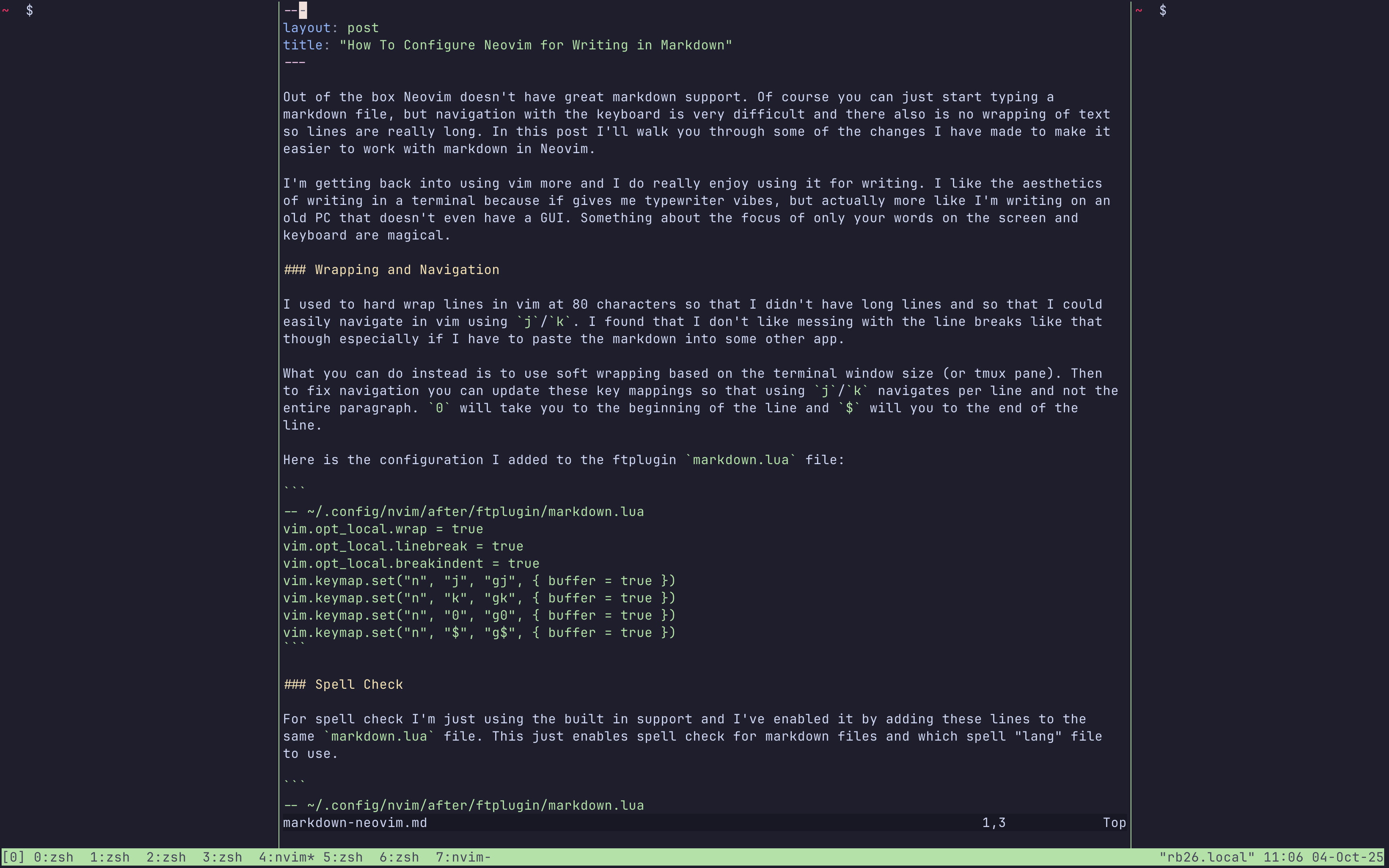
<p>Out of the box Neovim doesn’t have great markdown support. Of course you can just start typing a markdown file, but navigation with the keyboard is very difficult and there also is no wrapping of text so lines are really long. In this post I’ll walk you through some of the changes I have made to make it easier to work with markdown in Neovim.</p>

<p>I’m getting back into using vim more and I do really enjoy using it for writing. I like the aesthetics of writing in a terminal because if gives me typewriter vibes, but actually more like I’m writing on an old PC that doesn’t even have a GUI. Something about the focus of only your words on the screen and keyboard are magical.</p>

<h3 id="wrapping-and-navigation">Wrapping and Navigation</h3>

<p>I used to hard wrap lines in vim at 80 characters so that I didn’t have long lines and so that I could easily navigate in vim using <code class="language-plaintext highlighter-rouge">j</code>/<code class="language-plaintext highlighter-rouge">k</code>. I found that I don’t like messing with the line breaks like that though especially if I have to paste the markdown into some other app.</p>

<p>What you can do instead is to use soft wrapping based on the terminal window size (or tmux pane). Then to fix navigation you can update these key mappings so that using <code class="language-plaintext highlighter-rouge">j</code>/<code class="language-plaintext highlighter-rouge">k</code> navigates per line and not the entire paragraph. <code class="language-plaintext highlighter-rouge">0</code> will take you to the beginning of the line and <code class="language-plaintext highlighter-rouge">$</code> will you to the end of the line.</p>

<p>Here is the configuration I added to the ftplugin <code class="language-plaintext highlighter-rouge">markdown.lua</code> file:</p>

<div class="language-plaintext highlighter-rouge"><div class="highlight"><pre class="highlight"><code>-- ~/.config/nvim/after/ftplugin/markdown.lua
vim.opt_local.wrap = true
vim.opt_local.linebreak = true
vim.opt_local.breakindent = true
vim.keymap.set("n", "j", "gj", { buffer = true })
vim.keymap.set("n", "k", "gk", { buffer = true })
vim.keymap.set("n", "0", "g0", { buffer = true })
vim.keymap.set("n", "$", "g$", { buffer = true })
</code></pre></div></div>

<h3 id="spell-check">Spell Check</h3>

<p>For spell check I’m just using the built in support and I’ve enabled it by adding these lines to the same <code class="language-plaintext highlighter-rouge">markdown.lua</code> file. This just enables spell check for markdown files and which spell “lang” file to use.</p>

<div class="language-plaintext highlighter-rouge"><div class="highlight"><pre class="highlight"><code>-- ~/.config/nvim/after/ftplugin/markdown.lua
-- ...
--
-- spell check
vim.opt_local.spell = true
vim.opt_local.spelllang = { "en_us" }
</code></pre></div></div>

<p>To fix spelling you can use these commands:</p>

<ul>
  <li><code class="language-plaintext highlighter-rouge">]s</code> → jump to next misspelled word</li>
  <li><code class="language-plaintext highlighter-rouge">[s</code> → jump to previous</li>
  <li><code class="language-plaintext highlighter-rouge">z=</code> → suggestions for the word under cursor</li>
  <li><code class="language-plaintext highlighter-rouge">zg</code> → mark word as good</li>
  <li><code class="language-plaintext highlighter-rouge">zw</code> → mark word as bad</li>
</ul>

<p>I’m sure there other things that I’ll add in the future, but with just these changes I’ve found writing in Neovim much more enjoyable and productive.</p>]]></content><author><name>Blake Erickson</name></author><summary type="html"><![CDATA[]]></summary></entry><entry><title type="html">Omarchy for macOS?</title><link href="https://blake.app/blog/omarchy-for-macos/" rel="alternate" type="text/html" title="Omarchy for macOS?" /><published>2025-09-27T07:00:00+00:00</published><updated>2025-09-27T07:00:00+00:00</updated><id>https://blake.app/blog/omarchy-for-macos</id><content type="html" xml:base="https://blake.app/blog/omarchy-for-macos/"><![CDATA[<p>There has been a lot of chatter about <a href="https://omarchy.org/">Omarchy</a> and how amazing it is. I’m sure it is great, but I currently have a brand new 16” M4 MacBook Pro that I love and every time I’ve purchased a non-Apple laptop I always regret it for various reasons. Usually it ends up being the trackpad, fan noise, battery life, or some audio issue with crappy speakers or terrible mic.</p>

<p>I’m not against trying Omarchy on some other spare computer I have, but for now I’m sticking with my trusty MacBook Pro for my main computer.</p>

<p>I’ve been pretty lazy lately with my dev setup and I have not been using vim, a fancy terminal, or any window manager. While things were working fine with my current setup I was definitely starting to feel the pain of managing windows when I had 5 different Cursor windows open, many different browsers open, and many different terminals. Basically it was super difficult to find the specific application window and using “Mission Control” was very messy. I even shared my screen once on a work call to demo something and my coworkers got to see a glimpse of the craziness of my work environment. I wasn’t really embarrassed by it, but it made me realized how chaotic my single mac workspace was getting.</p>

<p>I’ve been looking to improve my computer setup without feeling like I have to ditch my mac and switch to Omarchy even though it is the cool thing at the moment.</p>

<p>So how can you achieve the Omarchy like experience on macOS? I’m getting pretty far using only these 4 apps:</p>

<ul>
  <li><a href="https://github.com/nikitabobko/AeroSpace">Aerospace</a> (a tiling window manager)</li>
  <li><a href="https://ghostty.org/">Ghostty</a> (a better terminal)</li>
  <li><a href="https://github.com/tmux/tmux/wiki">tmux</a> (a terminal multiplexer)</li>
  <li><a href="https://neovim.io/">Neovim</a> (a terminal based editor)</li>
</ul>

<p>Actually the only thing not included in Omarchy is just Aerospace, everything else like Ghostty, tmux, and nvim are included in Omarchy. Omarchy uses Hyprland for a window manager which is Linux only.</p>

<h3 id="aerospace"><a href="https://github.com/nikitabobko/AeroSpace">Aerospace</a></h3>

<p>The first thing to setup is Aerospace a tiling window manager for macOS. This is the first thing that I’ve changed with my workflow and its been great. The learning curve for some basic commands has been minimal and I’ve able to keep all my windows organized and easily switch between them using a couple of key strokes which has been way faster and easier than using Mission Control and trying to find a specific application window.</p>

<h3 id="ghostty"><a href="https://ghostty.org/">Ghostty</a></h3>

<p>I’ve been using iTerm2 for years now, but I did switch to Ghostty. That really hasn’t been a huge transition either and its been working great. The remaining two items tmux and nvim have quite the learning curve and I still have some setting up to do to get fully moved over to both.</p>

<h3 id="tmux"><a href="https://github.com/tmux/tmux/wiki">tmux</a></h3>

<p>While Ghostty has been easy to switch to, what hasn’t been super easy is using tmux inside of Ghostty. Mostly I just open a ton of terminal tabs inside of a single terminal window which I have been basically been doing inside of tmux, but it has also been nice to do some split panes which I want to get in the habit of doing more of. My leader key is also still the default <code class="language-plaintext highlighter-rouge">ctrl+b</code> which isn’t the easiest to always use so I might switch it to something like <code class="language-plaintext highlighter-rouge">capslock</code>. A couple of things you will need to configure for tmux is the ability to copy text out of the pane, scroll with the mouse, and also adjust the history-limit so that you can easily scroll through debug output like when using <code class="language-plaintext highlighter-rouge">bin/rails s</code>.</p>

<h3 id="neovim"><a href="https://neovim.io/">Neovim</a></h3>

<p>Neovim has also been difficult to get fully up and running in so I’m still using Cursor at the moment for my development work. I initially did install the <a href="https://www.lazyvim.org/">LazyVim distribution</a> but found it to be way too much, so now I’m currently rocking a very vanilla Neovim setup with the <a href="https://github.com/folke/lazy.nvim">lazy.vim</a> plugin manager. I really hate that they are basically called the same thing, very confusing. I’ve used vim a lot in the past and was very used to my previous setup and plugin manager so switching to Neovim has actually been quite difficult as it seems way more complex than whatever I was doing previously with a single <code class="language-plaintext highlighter-rouge">.vimrc</code> file.</p>

<p>I also use homebrew as the macOS package manager, but I’ve always been using that so that wasn’t really anything to transition to.</p>

<p>And that’s my current developer setup on macOS. I’m sure I’ll keep expanding it to include more <a href="https://community.folivora.ai/t/bringing-omarchy-to-macos-using-the-majestic-btt/44881">keyboard-everything options</a>, but for now I’ve been pretty happy with my setup and sticking with my trusty MacBook.</p>

<h4 id="update-2025-09-29">UPDATE 2025-09-29</h4>

<p>I just discovered this great post about <a href="https://blog.codinghorror.com/douchebaggery/">dhh bashing on programmers who use Windows</a> back in 2008. So not much has really changed. Just a different flavor of OS to hate on.</p>

<p>I absolutely love this quote in response which sums up exactly my original intent of this blog post:</p>

<blockquote>
  <p><strong>Don’t waste time arguing about the character select screen.</strong> Results speak loudest. Show the world what you can do in your programming environment of choice.</p>
</blockquote>]]></content><author><name>Blake Erickson</name></author><summary type="html"><![CDATA[There has been a lot of chatter about Omarchy and how amazing it is. I’m sure it is great, but I currently have a brand new 16” M4 MacBook Pro that I love and every time I’ve purchased a non-Apple laptop I always regret it for various reasons. Usually it ends up being the trackpad, fan noise, battery life, or some audio issue with crappy speakers or terrible mic.]]></summary></entry><entry><title type="html">I write my weekly update on Tuesdays</title><link href="https://blake.app/blog/i-write-my-weekly-update-on-tuesdays/" rel="alternate" type="text/html" title="I write my weekly update on Tuesdays" /><published>2023-06-02T15:35:32+00:00</published><updated>2023-06-02T15:35:32+00:00</updated><id>https://blake.app/blog/i-write-my-weekly-update-on-tuesdays</id><content type="html" xml:base="https://blake.app/blog/i-write-my-weekly-update-on-tuesdays/"><![CDATA[<p>We have a policy at Discourse that each employee needs to write up a weekly update summarizing what they did each week. The policy however does not state what day we have to publish said update. Most of my coworkers choose Friday. Which probably makes the most logical sense. You know mon-fri. I happen to have a weekly team call every Tuesday, so I switched my weekly updates to be published on Tuesday so that it cleanly lines up with my talking points on our team call. The other reason is Fridays are always chaos for me and I found that I’d much rather wrap up some code I’m in the middle of working on so that I can enjoy the weekend. Plus I’m near the west coast, so timezone wise no one is even around to read my weekly update on a Friday evening anyways. Thus, the reasoning for my Tuesday morning weekly update.</p>]]></content><author><name>Blake Erickson</name></author><summary type="html"><![CDATA[We have a policy at Discourse that each employee needs to write up a weekly update summarizing what they did each week. The policy however does not state what day we have to publish said update. Most of my coworkers choose Friday. Which probably makes the most logical sense. You know mon-fri. I happen to have a weekly team call every Tuesday, so I switched my weekly updates to be published on Tuesday so that it cleanly lines up with my talking points on our team call. The other reason is Fridays are always chaos for me and I found that I’d much rather wrap up some code I’m in the middle of working on so that I can enjoy the weekend. Plus I’m near the west coast, so timezone wise no one is even around to read my weekly update on a Friday evening anyways. Thus, the reasoning for my Tuesday morning weekly update.]]></summary></entry><entry><title type="html">Automating running scripts with user ruby</title><link href="https://blake.app/blog/automating-running-scripts-with-user-ruby/" rel="alternate" type="text/html" title="Automating running scripts with user ruby" /><published>2023-04-05T13:46:45+00:00</published><updated>2023-04-05T13:46:45+00:00</updated><id>https://blake.app/blog/automating-running-scripts-with-user-ruby</id><content type="html" xml:base="https://blake.app/blog/automating-running-scripts-with-user-ruby/"><![CDATA[<p>I’ve hit this twice now this week when trying to automate running ruby scripts, once for setting up a cloud-init file, and just now when setting up a cron job. This is of course because I’m executing the scripts as <em>my</em> user account and because ruby is tied to my user account as it was installed with <code class="language-plaintext highlighter-rouge">ruby-install</code> and <code class="language-plaintext highlighter-rouge">chruby</code>. I of course could of used a “system” installed ruby, but that is a discussion for another day, I really just wanted these scripts to run as me.</p>

<p>The root issue is that your <code class="language-plaintext highlighter-rouge">.bashrc</code>  file is returning early due to these lines that check if it is running “interactively” or not. So you can comment them out (lines 6-9):</p>

<div class="language-plaintext highlighter-rouge"><div class="highlight"><pre class="highlight"><code>   1 # executed by bash(1) for non-login shells.
   2 # see /usr/share/doc/bash/examples/startup-files (in the package bash-doc)
   3 # for examples
   4  
   5 # If not running interactively, don't do anything
   6 #case $- in
   7 #    *i*) ;;
   8 #      *) return;;
   9 #esac
</code></pre></div></div>]]></content><author><name>Blake Erickson</name></author><summary type="html"><![CDATA[I’ve hit this twice now this week when trying to automate running ruby scripts, once for setting up a cloud-init file, and just now when setting up a cron job. This is of course because I’m executing the scripts as my user account and because ruby is tied to my user account as it was installed with ruby-install and chruby. I of course could of used a “system” installed ruby, but that is a discussion for another day, I really just wanted these scripts to run as me.]]></summary></entry></feed>